

Invoice and Payment Follow-up Tracker: see who owes what and chase politely.
Type each invoice and what was paid. Get the balance, days overdue and ageing bucket for each invoice, then pick one of four follow-up messages.
One-time price $15. No subscription. Instant download.
Checkout and file delivery are handled by Whop, the merchant of record. After payment, Whop emails your receipt with a link to the download.
Who it is for
Solo freelancers and micro-agencies of one to five people who invoice by project, in deposits and milestones, and need to see which invoices are late.
A spreadsheet for freelancers who invoice by project. List each invoice or milestone, type what was paid, and see the balance, days overdue, ageing bucket and status. Four follow-up messages go from a friendly reminder to a final notice.
Who it is not for
- Anyone who needs an accounting system, an invoicing tool that sends invoices, or legal advice on collecting a debt. The messages are messages, not legal notices.
What is included
One ZIP. Formats: .xlsx, .docx.
- Blank workbook, .xlsx: Start here, Invoices, Summary, Version
- Worked-example workbook, .xlsx: the same sheets filled in with fictional invoices
- Payment follow-up scripts, .docx: friendly reminder, firm reminder, final notice before pausing work, payment received
- Read me, licence and changelog
The sheets
| Sheet | What you do there |
|---|---|
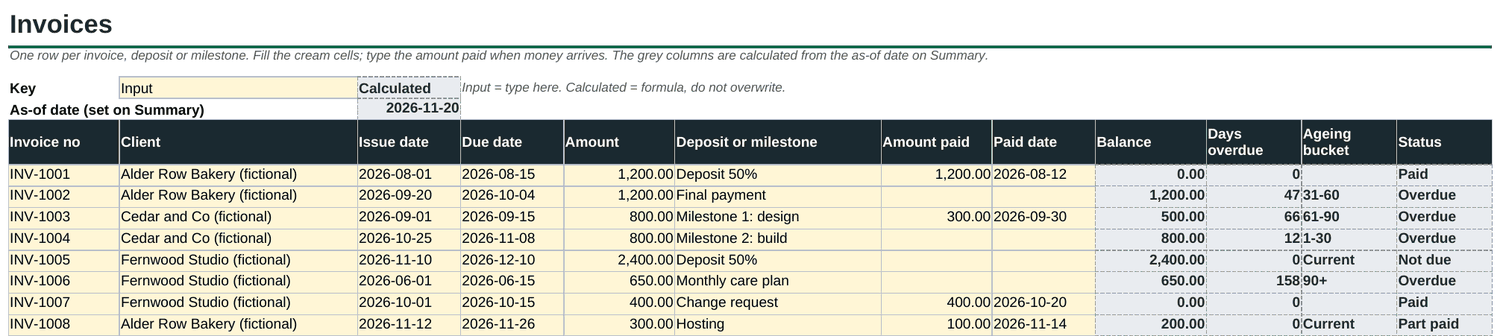
| Invoices | One row per invoice, deposit or milestone: number, client, issue and due dates, amount, label, amount paid and paid date. Balance, days overdue, ageing bucket and status are calculated. Up to 200 rows. |
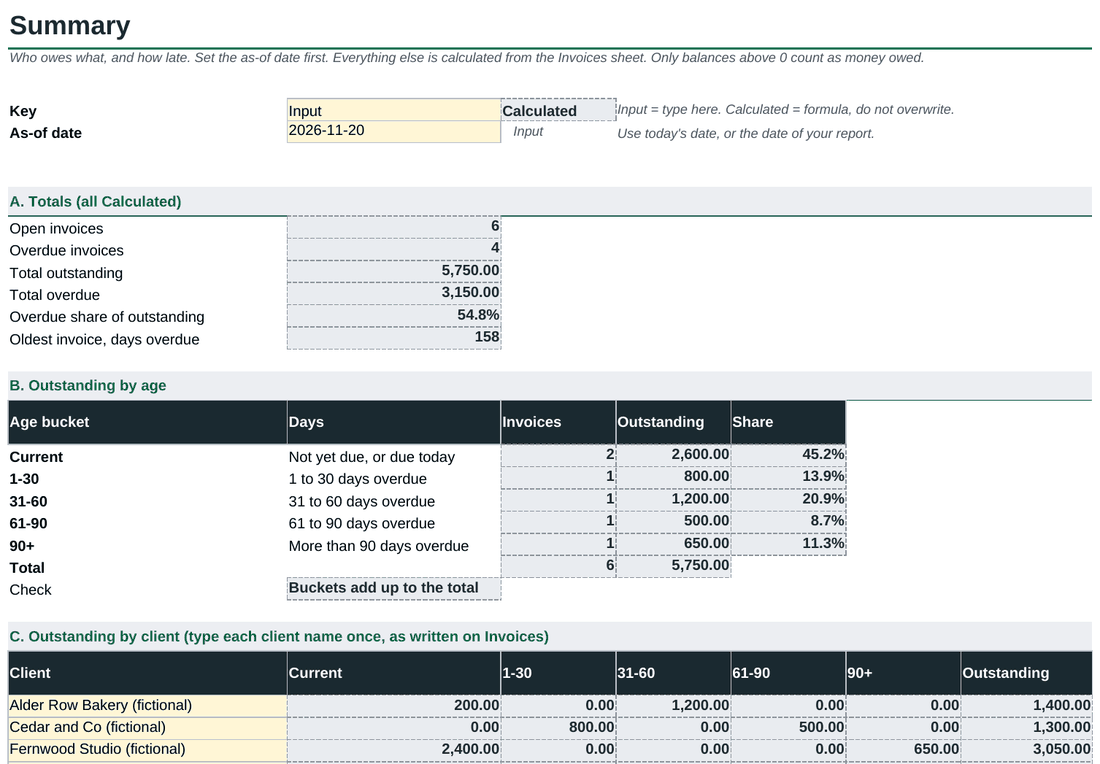
| Summary | Set an as-of date. See open and overdue invoices, total outstanding, money by age (Current, 1-30, 31-60, 61-90, 90+ days) and money by client and age. Up to 25 clients. |
How it works
- Set the as-of date on Summary. Use today's date, or the date of your report.
- Add a row on Invoices for each invoice, deposit or milestone. Type the amount paid and the date when money arrives.
- Read the status of each row: Paid, Part paid, Overdue or Not due. Summary shows how much is owed and how late it is.
- Pick the matching message from the Word file, fill in the bracketed parts and send it.
Previews of the real files
Renders of the worked-example workbook. Not mock-ups.
Limits, honestly
- Not an accounting system and not invoicing software. It does not create or send invoices, and it does not link to a bank or payment provider. You type the numbers.
- The messages are messages, not legal notices or debt collection advice. Rules on late payment differ by country. Ask your own adviser before taking any step beyond a message.
- The tracker does not add late fees or interest. It only counts days.
- One currency per file. The sheets add no currency symbol.
- Holds up to 200 invoice rows and 25 clients on the summary. A row with no due date counts as not overdue.
The formulas were recalculated in LibreOffice and checked against an independent calculation, including blank, zero, negative and very large inputs. No #DIV/0!, #VALUE! or #REF! errors appear. In Google Sheets, check the date formats after you upload the file.
Price and licence
$15 in US dollars, one time. No subscription, so there is nothing to cancel. Whop, the merchant of record, may add sales tax or VAT at checkout. The licence covers one business. Refunds: all sales are final once the download starts, and faulty files are fixed or replaced. After you buy, your order page explains downloads and re-downloads.
Questions before you buy
How is days overdue counted?
As-of date minus due date, never below zero, and only while a balance is still owed. An invoice due today is not overdue yet.
What if a client paid part of an invoice?
Type the amount paid. The balance drops, and the status says Part paid. If the due date has passed, the status says Overdue and the balance is still counted in its age bucket.
Does it send reminders?
No. It shows which invoices need a message. You send the message yourself, using the Word file.
Are the messages legal notices?
No. They are plain messages. They are not legal notices or debt collection advice. Ask your own adviser before taking any step beyond a message.
Does it work in Excel and Google Sheets?
It uses standard functions. The formulas were recalculated in LibreOffice and checked against a separate calculation. In Google Sheets, check the date formats after you upload the file.
How do I get it?
Buy it on this page. Whop handles checkout, and after payment it emails your receipt with a link to the download in your Whop account.
What if something is wrong with the files?
Email me and I will fix or replace the file. All sales are final once the download starts.
Related workbooks
Client Delivery Kit, $39
Templates for everything between the yes and the handoff.
Retainer Operations Kit, $24
Track hours against each retainer, carry unused hours forward and prepare renewals with facts.
See all products.