

Retainer Operations Kit: know where every retainer stands.
Track hours against each retainer, carry unused hours forward and prepare renewals with facts.
One-time price $24. No subscription. Instant download.
Checkout and file delivery are handled by Whop, the merchant of record. After payment, Whop emails your receipt with a link to the download.
Who it is for
Solo freelancers and micro-agencies who sell monthly retainers with included hours and want to see who is near the limit, who is over, and which clients are worth renewing.
A workbook that logs work against each retainer client. It shows hours used, remaining, overage, rollover and effective hourly rate per month. It also has a renewal review and two Word templates, a monthly client report and a change-of-scope record.
Who it is not for
- Anyone who needs a time tracker, an invoicing tool or a contract. It does not run timers, send invoices or create a legal agreement, and it is not legal or financial advice.
What is included
One ZIP. Formats: .xlsx, .docx.
- Blank workbook, .xlsx: Start here, Retainers, Monthly log, Monthly summary, Renewal review, Version
- Worked-example workbook, .xlsx: three fictional clients over three months
- Monthly client report template, .docx
- Change-of-scope record, .docx
- Read me, licence and changelog
The sheets
| Sheet | What you do there |
|---|---|
| Retainers | Client, monthly fee, included hours, whether unused hours roll over, the cap on rollover, start date and renewal date. |
| Monthly log | Date, client, task, hours and whether the work was in scope. The month is filled in for you. |
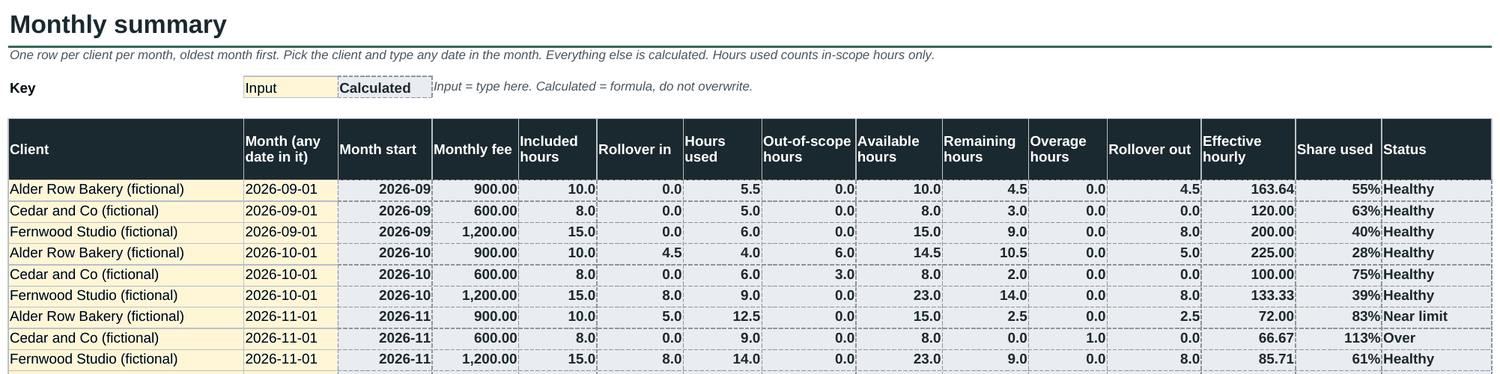
| Monthly summary | One row per client per month: hours used, included plus rollover in, remaining, overage, rollover out (capped), effective hourly (fee divided by hours used) and a status of Healthy, Near limit or Over. |
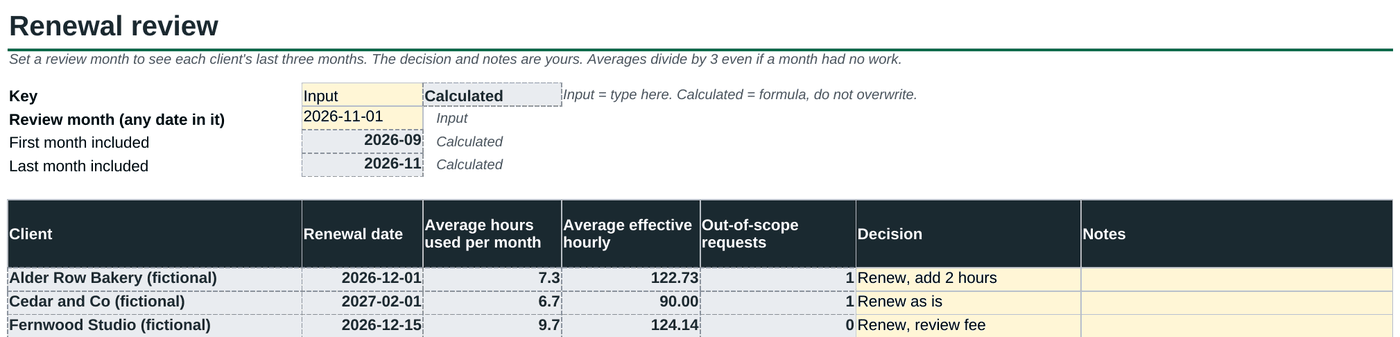
| Renewal review | Per client: average hours used over the last three months, average effective hourly, out-of-scope requests, renewal date and a decision field. |
How it works
- List each client on Retainers: monthly fee, included hours, whether unused hours roll over, the cap on rollover and the renewal date.
- Log every piece of work on Monthly log with the client, hours and whether it was in scope.
- At month end, add one row per client on Monthly summary. It shows hours used, hours remaining, overage, rollover out, effective hourly and a status.
- Before a renewal, set the review month on Renewal review. See three-month average use, effective hourly and out-of-scope requests, then write down your decision.
- Send the Word monthly report. When a request falls outside the retainer, fill in the change-of-scope record.
Previews of the real files
Renders of the worked-example workbook. Not mock-ups.
Limits, honestly
- Not a contract and not legal, tax or financial advice. The Word files record what you and the client agreed. They do not create the agreement.
- Hours used counts in-scope hours. Hours marked out of scope are shown separately, so effective hourly does not include them.
- Status is Healthy under 80% of available hours used, Near limit from 80% to 100%, and Over above 100%.
- Add the monthly summary rows oldest month first, so rollover hours carry forward.
- No timers and no invoices. You log the hours yourself.
The formulas were recalculated in LibreOffice and checked against an independent calculation, including blank, zero, negative and very large inputs. No #DIV/0!, #VALUE! or #REF! errors appear. In Google Sheets, check the dropdown lists and date formats after you upload the file.
Price and licence
$24 in US dollars, one time. No subscription, so there is nothing to cancel. Whop, the merchant of record, may add sales tax or VAT at checkout. The licence covers one business. Refunds: all sales are final once the download starts, and faulty files are fixed or replaced. After you buy, your order page explains downloads and re-downloads.
Questions before you buy
How is rollover worked out?
If a client allows rollover, unused hours from last month carry in, capped at the max rollover hours you set for that client. If rollover is not allowed, unused hours expire.
What counts as hours used?
Logged hours marked in scope, or with the in-scope column left blank. Hours marked No are shown as out-of-scope hours and do not use up the allowance.
Is it a time tracker?
No. You log hours by hand on the Monthly log sheet, from whatever tracker or notes you already use.
Are the Word files contracts?
No. They record what was done and what was agreed. Have your own adviser review the terms you use with clients.
Does it work in Excel and Google Sheets?
It uses standard functions. The formulas were recalculated in LibreOffice and checked against a separate calculation. In Google Sheets, check the dropdowns and dates after you upload the file.
How do I get it?
Buy it on this page. Whop handles checkout, and after payment it emails your receipt with a link to the download in your Whop account.
What if something is wrong with the files?
Email me and I will fix or replace the file. All sales are final once the download starts.
Related workbooks
Client Delivery Kit, $39
Templates for everything between the yes and the handoff.
Rate and Profitability Planner, $17
Work out the lowest hourly rate that pays you, then check finished projects against it.
See all products.