

Rate and Profitability Planner: find the lowest rate that pays you.
Work out the lowest hourly rate that pays you, then check finished projects against it.
One-time price $17. No subscription. Instant download.
Checkout and file delivery are handled by Whop, the merchant of record. After payment, Whop emails your receipt with a link to the download.
Who it is for
Solo freelancers and micro-agencies of one to five people who price by the hour or by the project and want to know whether their rates cover their income target and their costs.
A spreadsheet that turns your target yearly income, yearly business costs and working time into a minimum hourly rate and a day rate. Then check each finished project against that rate. Compare three plans side by side.
Who it is not for
- Anyone who needs tax, accounting or financial advice. It does not know your tax rules, it is not payroll or invoicing software, and it does not forecast sales.
What is included
One ZIP. Formats: .xlsx.
- Blank workbook, .xlsx: Start here, Rate, Project check, Scenarios, Version
- Worked-example workbook, .xlsx: the same sheets filled in with fictional numbers
- Read me, licence and changelog
The sheets
| Sheet | What you do there |
|---|---|
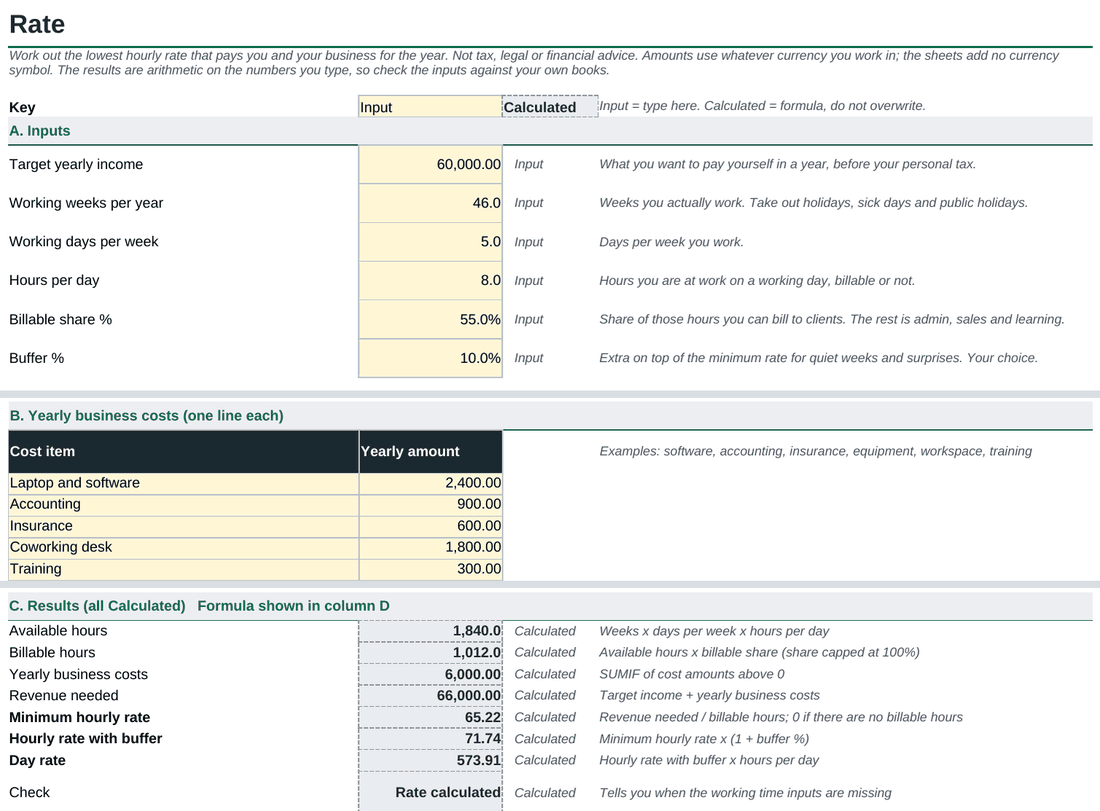
| Rate | Enter your target yearly income, yearly business costs and working time. Get available hours, billable hours, revenue needed, a minimum hourly rate, a rate with buffer and a day rate. |
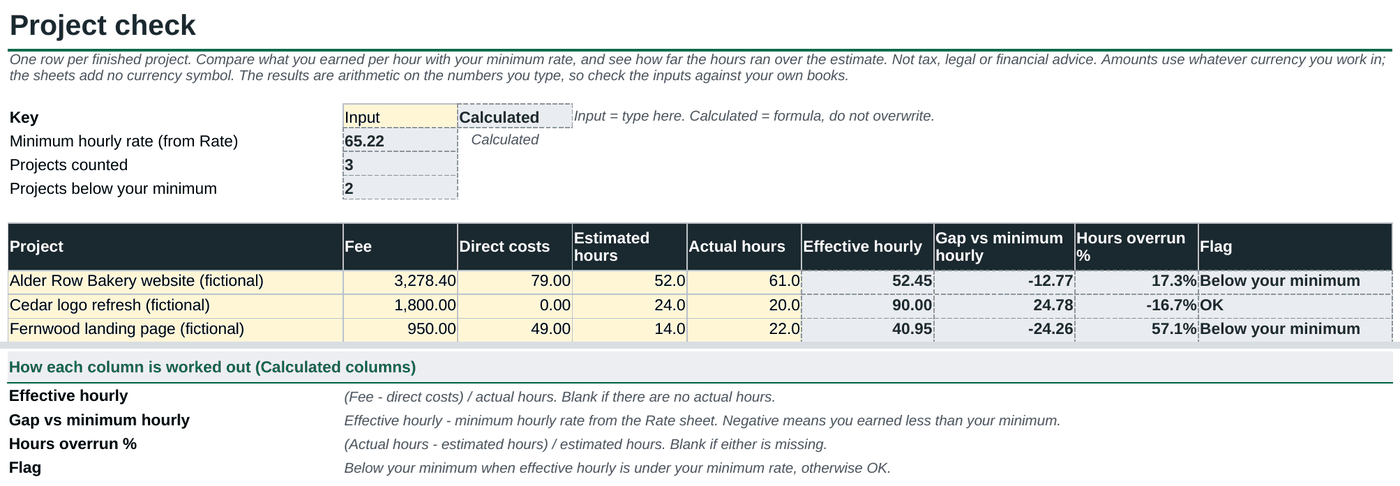
| Project check | One row per finished project: fee, direct costs, estimated and actual hours. Shows effective hourly, the gap to your minimum, the hours overrun and a flag: Below your minimum or OK. |
| Scenarios | Three plans side by side. Change billable share, working weeks or hourly rate and see yearly revenue and the gap to the revenue you need. |
How it works
- Fill in the Rate sheet: target yearly income, working weeks, days per week, hours per day, billable share, buffer, and your yearly business costs line by line.
- Read the minimum hourly rate, the rate with your buffer and the day rate. Each formula is written out beside its result.
- After each project, add a row on Project check: fee, direct costs, estimated hours and actual hours. See what you really earned per hour and how far the hours ran over.
- Try three plans on Scenarios. Change billable share, working weeks or hourly rate and compare yearly revenue with the revenue you need.
Previews of the real files
Renders of the worked-example workbook. Not mock-ups.
Limits, honestly
- Not tax, legal or financial advice. Target income is what you want to pay yourself before personal tax. The planner does not model tax.
- The results are arithmetic on the numbers you type. If the inputs are guesses, the rate is a guess.
- One currency per file. The sheets add no currency symbol.
- No link to invoices or time trackers. You type or paste the numbers.
- Holds up to 20 cost lines and 20 finished projects. Add your own rows by inserting inside the ranges.
The formulas were recalculated in LibreOffice and checked against an independent calculation, including blank, zero, negative and very large inputs. No #DIV/0!, #VALUE! or #REF! errors appear. In Google Sheets, check the dropdown lists and date formats after you upload the file.
Price and licence
$17 in US dollars, one time. No subscription, so there is nothing to cancel. Whop, the merchant of record, may add sales tax or VAT at checkout. The licence covers one business. Refunds: all sales are final once the download starts, and faulty files are fixed or replaced. After you buy, your order page explains downloads and re-downloads.
Questions before you buy
Is the day rate just the hourly rate times eight?
No. It is the hourly rate with your buffer, times the hours per day that you set on the Rate sheet.
Does it include tax?
No. Target income is what you want to pay yourself before personal tax. Ask your own adviser how tax applies to you.
Can I use my own currency?
Yes. The sheets add no currency symbol. Use one currency throughout the file.
Does it work in Excel and Google Sheets?
It uses standard functions. The formulas were recalculated in LibreOffice and checked against a separate calculation. In Google Sheets, check the dropdowns and dates after you upload the file.
How do I get it?
Buy it on this page. Whop handles checkout, and after payment it emails your receipt with a link to the download in your Whop account.
What if something is wrong with the files?
Email me and I will fix or replace the file. All sales are final once the download starts.
Related workbooks
Client Delivery Kit, $39
Templates for everything between the yes and the handoff.
Retainer Operations Kit, $24
Track hours against each retainer, carry unused hours forward and prepare renewals with facts.
See all products.