

Studio Capacity Planner: see 12 weeks of hours before you say yes.
List your people and bookings. See available, booked and free hours for each person and week, with Over and Tight flags.
One-time price $19. No subscription. Instant download.
Checkout and file delivery are handled by Whop, the merchant of record. After payment, Whop emails your receipt with a link to the download.
Who it is for
Solo freelancers and studios of up to 15 people who run several projects at once and want to check whether a new job fits the next 12 weeks.
A spreadsheet for small studios with several projects running at once. List each person's weekly hours and billable share, add a row for each booking, and read 12 weeks of available, confirmed, pencilled and free hours, utilisation and a flag. A summary lists the over-booked weeks.
Who it is not for
- Anyone who needs a project management app, a time tracker or a scheduler for a large team. It does not know about tasks or deadlines, it does not record what people actually worked, and it covers 12 weeks at a time.
What is included
One ZIP. Formats: .xlsx.
- Blank workbook, .xlsx: Start here, People, Bookings, Capacity, Summary, Version
- Worked-example workbook, .xlsx: three fictional people and six fictional projects
- Read me, licence and changelog
The sheets
| Sheet | What you do there |
|---|---|
| People | One row per person: hours per week available, billable share and up to four weeks off. |
| Bookings | One row per project and person: start and end date, hours per week and a status of Confirmed or Pencilled. |
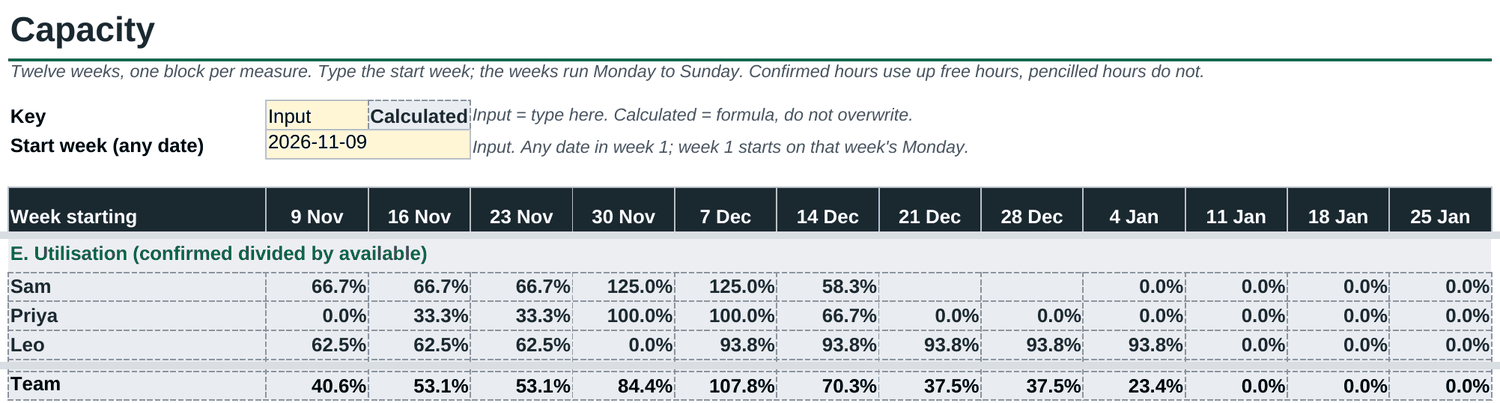
| Capacity | Type a start week. For each person and each of 12 weeks: available hours, confirmed and pencilled hours, free hours, utilisation and a flag of Over or Tight. Team totals sit under each block. |
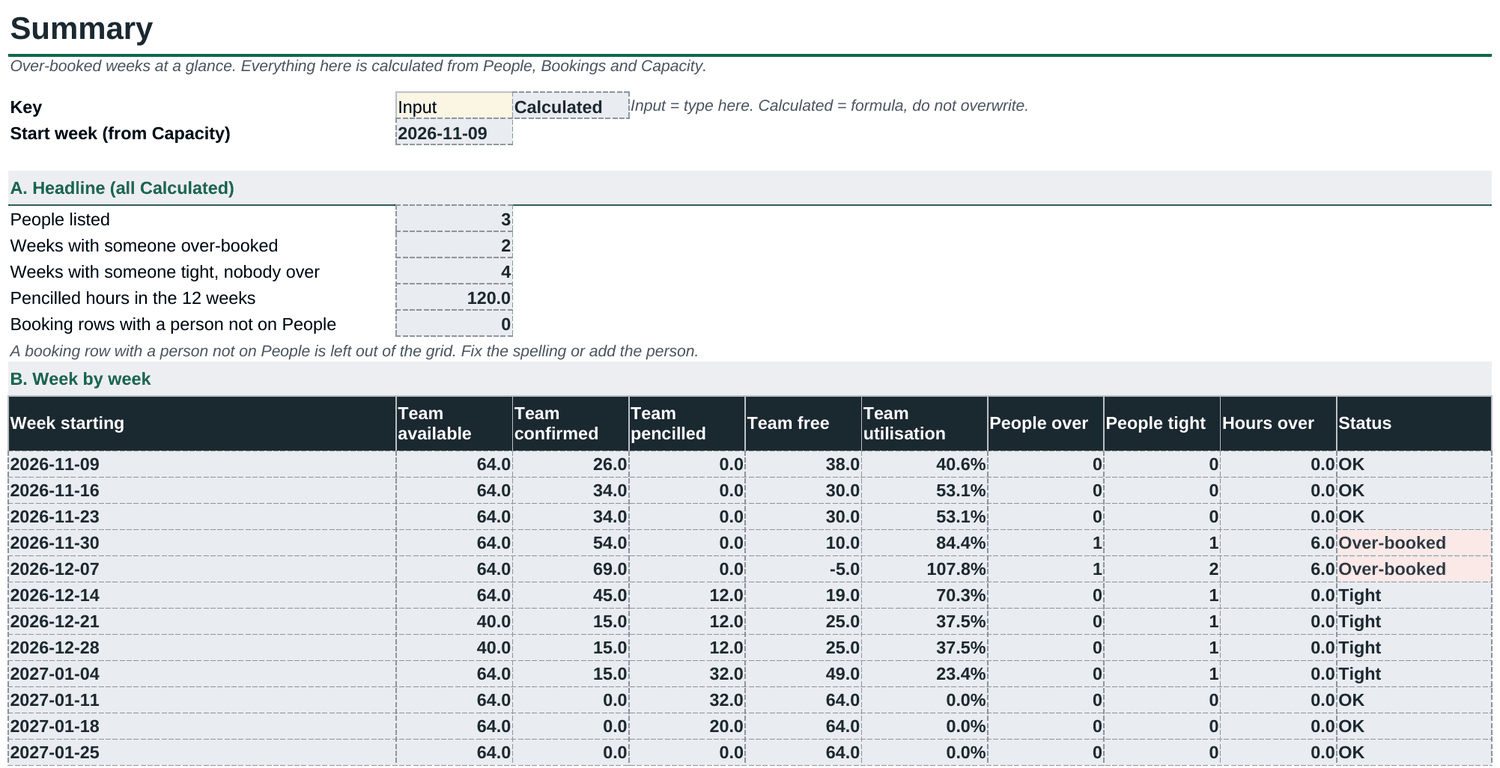
| Summary | Counts of over-booked and tight weeks, one line per week with the hours over, and one line per person with weeks over, weeks tight and peak utilisation. |
How it works
- List each person on People: weekly hours, the share you can bill and any weeks off.
- Add a row on Bookings for each project and person, with dates, hours per week and Confirmed or Pencilled.
- Type the start week on Capacity. Read available, booked and free hours for each person and week. Over means confirmed hours are above available hours. Tight means 90% or more.
- Open Summary to see which weeks are over-booked, then add your next job as a Pencilled booking to see whether it fits.
Previews of the real files
Renders of the worked-example workbook. Not mock-ups.
Limits, honestly
- Not a project management or time-tracking app. It adds up the bookings you type. It does not know about tasks, deadlines or what people really worked.
- A booking counts its full hours per week in every week it touches, even a part week.
- Free hours subtract confirmed bookings only. Pencilled hours are shown but not subtracted.
- Up to 15 people, 200 booking rows and 12 weeks at a time. A booking needs a person, both dates, hours above 0 and a status.
- Each person's name must be spelled the same on People and Bookings. Summary counts booking rows that do not match a person.
- Not tax, legal or financial advice. Hours only, no money.
The formulas were recalculated in LibreOffice and checked against an independent calculation, including blank, zero, negative, overlapping and very large inputs, weeks off and part weeks. No #DIV/0!, #VALUE! or #REF! errors appear. In Google Sheets, check the dropdown lists and date formats after you upload the file.
Price and licence
$19 in US dollars, one time. No subscription, so there is nothing to cancel. Whop, the merchant of record, may add sales tax or VAT at checkout. The licence covers one business. Refunds: all sales are final once the download starts, and faulty files are fixed or replaced. After you buy, your order page explains downloads and re-downloads.
Questions before you buy
How is a week counted?
Weeks run Monday to Sunday. The start week you type can be any date, and week 1 is the Monday on or before it.
How do I enter a week off?
Type any date inside that week on People. Up to four per person. The person has 0 available hours that week.
What is the difference between Confirmed and Pencilled?
Confirmed work uses up free hours and can trigger Over or Tight. Pencilled work is a possible job. It is added up on its own, so you can see what would happen if it went ahead.
When does a week show Over or Tight?
Over when a person's confirmed hours are above their available hours. Tight when confirmed hours are 90% or more of available hours and not over.
Is it a project management app?
No. There are no tasks, timers or deadlines. It answers one question: does this work fit the hours we have?
Does it work in Excel and Google Sheets?
It uses standard functions. The formulas were recalculated in LibreOffice and checked against a separate calculation. In Google Sheets, check the dropdowns and dates after you upload the file.
How do I get it?
Buy it on this page. Whop handles checkout, and after payment it emails your receipt with a link to the download in your Whop account.
What if something is wrong with the files?
Email me and I will fix or replace the file. All sales are final once the download starts.
Related workbooks
Rate and Profitability Planner, $17
Work out the lowest hourly rate that pays you, then check finished projects against it.
Retainer Operations Kit, $24
Track hours against each retainer, carry unused hours forward and prepare renewals with facts.
See all products.